Online file sharing lets teams access, edit, and discuss documents from any device without email attachments or version confusion. With the right tools, work moves faster, mistakes drop, and everyone stays aligned, even across different locations and time zones.


Riya Sarkar
I write to shape ideas into something clear, engaging, and meaningful. I enjoy working across different industries, adapting skills to fit each brand I create for. My focus is on making content feel natural, easy to connect with, and worth reading. For me, good writing isn’t just about words, it’s about creating something that stays with the reader.

Why Are People Not Interested to Vote?
Is eShare.ai Free? Here’s Everything You Need to Know

How Teams Can Speed Up Client Approvals with E-Signature Tools

Why online file sharing speeds up teamwork
In many offices, people still send files as email attachments, save copies on their desktops, and pass USB drives around. This creates a mess of versions, lost updates, and long delays while waiting for the “final” file. When a team grows or works remotely, this old way becomes a major bottleneck.
Online file sharing changes this by keeping all files in one secure online space that syncs across devices. Instead of emailing attachments, team members open a link, work on the same document, and see changes in real time. This removes the “which version is correct?” problem and cuts down on back-and-forth messages.
With a good file sharing platform, you also get clear permissions, activity logs, and easy search. You can control who can view, comment, or edit each file, and track who made which changes. This makes collaboration smoother, safer, and much easier to manage, especially for teams that handle sensitive client or project data.
How a modern file sharing platform improves daily work
Real-time editing and clear communication
Real-time editing is one of the biggest gains from moving to online document sharing. Multiple people can work on the same document, spreadsheet, or presentation at once, seeing each other’s changes as they happen. This is far faster than sending versions back and forth and waiting for feedback.
Built-in comments and chat keep discussions tied to the right file. Instead of long email threads, team members leave notes directly on the document, tag colleagues, and resolve issues in context. This reduces misunderstandings and makes it clear what has been decided and what still needs work.
For marketing, sales, and product teams that constantly update decks, proposals, and specs, this setup saves hours every week. New joiners can read the comment history to understand past decisions, and managers can see how work is progressing without constant status meetings.
Secure file sharing with controlled access
Security is a top concern when files leave local drives, but modern cloud file sharing tools offer strong protections. They use encryption, role-based access, and detailed logs to show who opened or edited each file. This is essential for industries like healthcare, legal, finance, and education.
Instead of attaching large files to emails, teams share secure links with specific rights: view-only, comment-only, or edit access. You can set expiry dates, add passwords, and restrict downloads. This lowers the risk of sensitive data ending up in the wrong inbox or being forwarded beyond the intended audience.
Advanced platforms also support two-factor login, device management, and alerts for unusual activity. When security is built into the file sharing platform, IT teams spend less time fixing problems and more time enabling safe, efficient ways of working across the organization.
Organized workspaces and smoother workflows
A good online file sharing service does more than store files; it organizes them into clear workspaces. You can create folders by project, client, department, or process, with consistent names and tags. This makes it easy to find what you need without digging through messy drives.
Many platforms connect file storage with task boards, calendars, and activity trackers. A project folder can include tasks, deadlines, and discussions, so everything related to that work lives in one place. This reduces context switching and helps teams stay focused on what matters.
When workflows are tied to files, processes become more visible. You can see who accessed which document, how long reviews took, and where bottlenecks appear. This data supports continuous improvement and helps justify process changes with real evidence instead of guesswork.
Business file sharing in action: common use cases
Marketing and creative teams
Marketing and creative teams handle many versions of campaign assets, brand guidelines, and client proposals. With online file sharing, they can store all assets in a central workspace, organized by campaign or client. Designers, copywriters, and managers can comment directly on files and track changes without long email chains.
Approval workflows become clearer. A draft can move from “in progress” to “review” to “approved” with status tags and comments. Clients can view final proofs through secure links and give feedback without needing full platform access. This speeds up delivery and improves client experience.
Version history ensures no work is lost. If someone makes a mistake, you can roll back to an earlier version in a few clicks. This safety net encourages experimentation and faster iteration, which is critical in fast-moving campaigns and product launches.
Sales and client-facing teams
Sales teams rely on proposals, contracts, pricing sheets, and case studies. A well-structured file sharing platform keeps these documents up to date and easy to find. Reps can pull the latest version before a meeting, knowing it has the correct pricing and terms.
Secure file sharing with clients becomes professional and controlled. Instead of emailing large attachments, sales reps send secure links to proposals and contracts. Clients can view, comment, and sign electronically, with full audit trails of who accessed what and when.
This approach also supports compliance. You can restrict downloads, set link expiry, and require passwords for sensitive deals. For regulated industries, these controls are often required and simplify audits by providing clear records of document access and approvals.
Operations, HR, and internal teams
Operations and HR teams manage policies, procedures, onboarding materials, and internal reports. Online document sharing makes it easy to keep these files current and accessible. When a policy changes, you update one file, and everyone sees the new version immediately.
Onboarding becomes smoother. New hires get access to curated folders with policies, training guides, and templates. They can explore past projects and learn from historical documents without depending on a single “knowledge keeper.” This reduces risk when senior staff leave.
Internal audits and compliance checks are easier too. You can generate reports showing who accessed which files and when, and prove that only authorized staff saw sensitive HR or financial data. This transparency builds trust and simplifies regulatory reporting.
Steps to implement online file sharing without disruption
Map current files and pain points
Before moving to a new system, understand how files are currently stored and where problems occur. Audit existing drives, shared folders, and personal storage. Identify duplicate files, outdated content, and areas where access is too open or too restricted.
Talk to department heads and power users about their biggest frustrations: slow search, version conflicts, missing files, or security worries. These insights will shape the new folder structure, permission model, and feature priorities. A migration driven by real pain points is more likely to gain adoption.
Document current processes for sharing, approving, and archiving files. This baseline will help you design better workflows in the new system and measure improvement after the transition. It also highlights training needs and change management priorities before the move begins.
Design a clear folder plan and access rules
A thoughtful folder hierarchy is the foundation of effective cloud file sharing. Instead of copying messy on-premise structures, design a clean, logical layout based on how the business actually operates. Common approaches include organizing by department, project, client, or process, with consistent naming rules.
Define roles and permissions early. Decide who should have full edit access, who should only view or comment, and which folders need stricter controls. Use groups rather than individual assignments where possible to simplify management as teams change. Clear rules around external sharing (clients, partners, contractors) prevent accidental overexposure.
Involve key stakeholders in reviewing the proposed structure before migration. Their feedback can uncover edge cases and ensure the design supports real workflows. Once agreed, document the structure and permission guidelines so they can be referenced during onboarding and future audits.
Move in stages with training and support
Trying to migrate everything at once often leads to confusion and pushback. A phased approach, starting with a pilot department or project, lets you test the new structure, refine permissions, and gather feedback before scaling. Choose a group that is motivated and representative of broader usage patterns.
Provide focused training that covers everyday tasks: uploading and organizing files, sharing with the right permissions, using version history, and collaborating in real time. Short, role-specific sessions work better than generic overviews. Add quick-reference guides and short video tutorials that users can revisit.
Set up a support channel for questions and issues during the transition. This could be a dedicated chat group, email alias, or office hours with an internal champion. Fast resolution of early problems prevents frustration from spreading and builds confidence in the new system.
Choosing the right online file sharing service
Security and compliance first
When selecting a platform, security should be your first filter. Look for end-to-end encryption, strong login options, and fine-grained permission controls. Review the provider’s compliance certifications and data residency options, especially if you operate in regulated industries or multiple regions.
Examine how the platform handles external sharing. Can you set link expiry, require passwords, restrict downloads, or limit access to specific domains? Are there detailed audit logs that show who accessed which file and when? These features are critical for maintaining control as collaboration expands beyond internal teams.
Consider administrative capabilities: can you manage users and groups easily, enforce policies, and integrate with existing identity systems? A platform that is secure but hard to administer may lead to workarounds that weaken that security. Balance strong protection with practical manageability.
Collaboration features and app connections
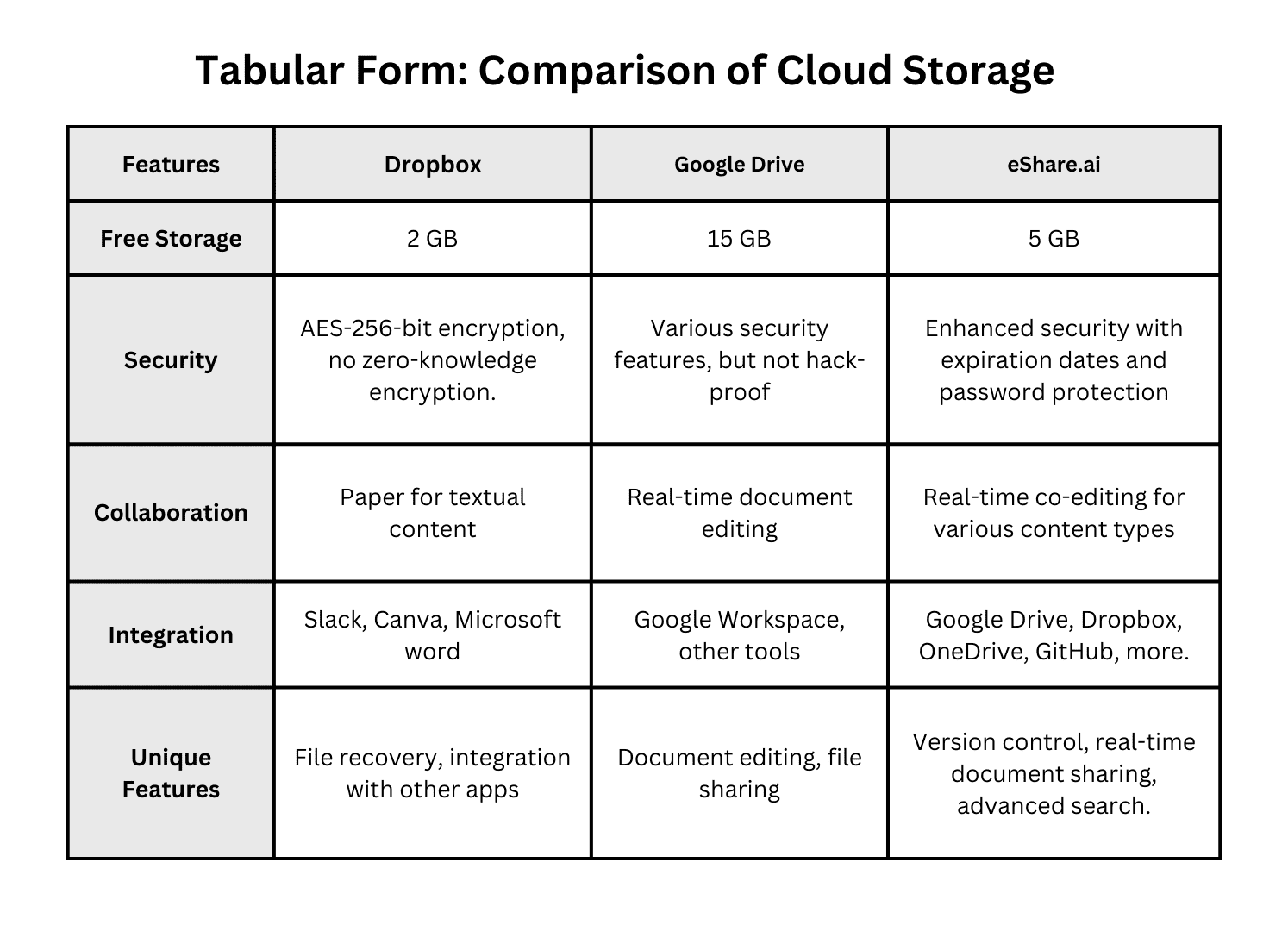
Beyond storage, evaluate the collaboration tools that come with the platform. Do they support real-time editing of documents, spreadsheets, and presentations? Are there built-in chat, comments, and task management features that keep work tied to the relevant files? These capabilities determine how much the platform becomes a daily work hub versus a passive archive.
Check integration options with your existing tools: email, CRM, project management, HR, and accounting systems. Native integrations reduce friction, while open APIs allow custom connections for unique workflows. The goal is to minimize context switching and keep work flowing smoothly between systems.
Also consider the user experience on different devices. Teams increasingly work from phones, tablets, and laptops, often switching between them during the day. A platform with consistent, intuitive interfaces across devices will see higher adoption and fewer support requests.
Pricing, storage, and growth path
Pricing models vary widely: per-user, per-GB, tiered plans with feature bundles, or freemium options with paid upgrades. Map your current usage and projected growth over the next 12–24 months to estimate total cost under different scenarios. Beware of plans that look cheap at first but become expensive as you add users or storage.
Free tiers can be powerful starting points for small teams or pilots. Some platforms offer generous free storage (for example, 10 GB) with core collaboration features, allowing you to validate the solution before committing financially. Ensure that upgrading is straightforward and that higher tiers unlock the features you will need as you scale.
Finally, consider the total value, not just the price. A slightly higher-cost platform that significantly reduces IT overhead, improves productivity, and lowers risk may deliver better ROI than a cheaper option that requires extensive customization and support.
FAQ
What is online file sharing and how does it work?
Online file sharing is a method of storing and distributing digital files over the internet instead of using local drives or email attachments. You upload documents, images, and other data to a secure cloud platform, which keeps them in data centers with backups and redundancy. Authorized users can then access these files from any internet-connected device, share them with specific permissions, and collaborate in real time without needing to be in the same office.
How does online file sharing improve team collaboration?
Online file sharing improves team collaboration by giving everyone a single, up-to-date source of truth for documents and assets. Team members can edit files simultaneously, leave comments, and track changes without emailing versions back and forth. Integrated tools like chat, tasks, and calendars keep discussions tied to the relevant files, so context is never lost. This reduces misunderstandings, speeds up review cycles, and makes onboarding new team members much easier.
Is secure file sharing possible with cloud tools?
Yes, secure file sharing is possible with modern cloud tools when configured properly. Leading platforms use strong encryption for data in transit and at rest, offer role-based access controls, and provide detailed audit logs of who accessed which files. Many also support two-factor authentication, device management, and compliance certifications that align with industry regulations. The key is to choose a reputable provider and enforce good internal policies around sharing and permissions.
What should I look for in a file sharing platform for business?
When choosing a file sharing platform for business, focus on strong security, intuitive collaboration tools, and flexible pricing that matches your growth. Key factors include encryption, granular permissions, audit logs, and compliance support, plus real-time editing, comments, and task management for day-to-day work. Consider how well the platform integrates with your existing tools and whether it offers reliable mobile and desktop apps. A good solution balances protection, usability, and cost while scaling smoothly as your team expands.
How is cloud file sharing different from email attachments?
Cloud file sharing differs from email attachments by storing files in a central online location instead of sending copies through email. With attachments, each recipient gets their own version, leading to confusion and multiple copies. With cloud file sharing, everyone accesses the same file, sees updates in real time, and works from a single source of truth. This reduces version conflicts, saves storage space, and makes collaboration faster and more organized.
Can online document sharing help with client and partner work?
Yes, online document sharing can greatly improve work with clients and partners by providing secure, controlled workspaces. Instead of emailing large attachments, you share links with specific permissions and optional expiry dates, ensuring only the right people see sensitive files. Some platforms also support e-signatures, branded portals, and detailed activity logs, which create a professional, transparent experience and simplify compliance reporting for regulated industries.
How do I migrate from local drives to online file sharing smoothly?
You can migrate smoothly by moving in stages, starting with a pilot group or project to test your new folder structure and permissions. Audit your current files first to remove duplicates and outdated content, then design a clear hierarchy based on how teams actually work. Provide targeted training and quick-reference guides, and set up a support channel for questions during the transition. This staged approach minimizes disruption, builds confidence, and allows you to refine the setup before rolling it out company-wide.
What are the long-term benefits of using online file sharing?
Long-term, online file sharing reduces costs by removing the need for on-premise servers, ongoing maintenance, and unexpected upgrade expenses. You pay for what you use, scaling up or down as needs change, which avoids over-provisioning. Improved productivity from better collaboration, fewer IT incidents, and faster onboarding also translates into indirect savings. For many businesses, these combined benefits deliver a stronger return on investment compared to maintaining traditional local file systems.